teamspace

Hybrid work: office, home office and on the move in one system.

If you work hybrid, you clock in sometimes at the office, sometimes at home, sometimes at a client's site. teamspace brings the three locations together in a single time record, lets everyone book their own office day, and shows the team who is in and when. One use case of workplace management.

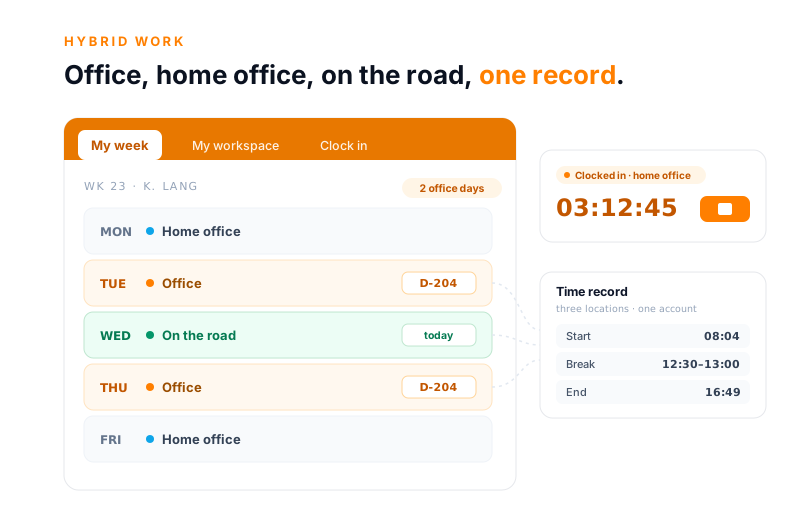
teamspace hybrid work: a weekly bar shows the work location for each day, office with a booked desk D-204 on Tuesday and Thursday, home office otherwise, on the move on Wednesday. On the right, the hours come together in a single time record with start, break and end.

The comparison

Three separate tools or one system?

Three separate tools

  • Attendance in an Excel plan that hardly anyone keeps up to date
  • Appointments in Outlook, kept apart from the rest
  • Hours in a separate record, handled differently depending on location
  • Who works where and when is nowhere in one place
Recommended

teamspace

  • Office, home-office and field-work days on the same member of staff
  • Hours in a single record, no matter where you clock in from
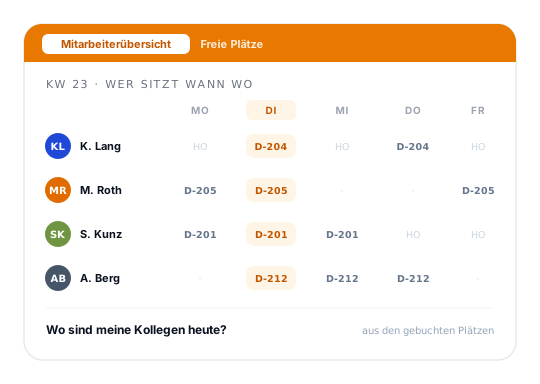
  • Who is in the office and when is shown in the staff overview
  • One login for booking, clocking and analysis
Three locations

One member of staff, three work locations, one record.

The same person sits sometimes at the office, sometimes at home, sometimes at a client's site. Attendance is captured differently at each location: the booked desk in the office, the browser clock-in at home, the installed web app on the move. In the end, everything lands in a single time record on the same member of staff.

KL

K. Lang

Vertragszeit 40 h · Mo–Fr

eine Woche

Büro

Schreibtisch D-204 gebucht
Stempel Tablet / Browser
Arbeitsort Büro

Home-Office

Stempel Browser
Pausen automatisch
Arbeitsort Home-Office

Unterwegs

Stempel App (PWA)
Ort beim Kunden
Arbeitsort extern

Eine Stundenaufzeichnung · Beginn, Ende und Pausen, lückenlos in einer Stundenaufzeichnung

Clocking in

Clock in, wherever the work happens.

Whether someone is at the office, in the home office or at a client's site makes no difference to the record. With a single click they clock in and out, and the system works out breaks itself according to the rules you have set. Start, end and breaks sit on the same day in the same record, in line with the ECJ ruling on working-time records.

The work location travels along as a category: office, home office or external work. Clocking happens in the browser, as an installed web app on the smartphone, or on the tablet that stands at the entrance as a terminal. How clocking works at home is covered in more depth on time tracking in the home office.

Why one system

What hybrid work in one system delivers.

One record across all locations

  • Office, home office and on the move in one time account
  • Start, end and breaks without gaps, no matter where from
  • The work location travels along as a category with each booking

The office day belongs to the team

  • See in advance who from the team is in on the same day
  • Set the shared on-site day without chains of emails
  • Desk and parking space booked in advance, by yourself

Analysable, not estimated

  • Home-office share as a metric at the push of a button
  • Work location analysable across all staff
  • A basis for decisions about office space

Default schedule

You set up the office rhythm once.

A hybrid working day rarely has a fixed pattern for everyone, but almost everyone has their own. If you are regularly on site on Tuesdays and Thursdays, you set that as a default schedule: for each weekday it shows whether it is office with a reserved desk or home office. From an effective date, the schedule applies automatically, week after week.

If a single week shifts, no one has to touch the whole schedule. The individual day is overwritten, and the rest carries on. So only the exception has to be booked by hand; the normal case takes care of itself.

“Staff in both support and project planning can see orders and invoices. That was not possible before.”

In support as well as in project planning, staff see the same cases, no matter which location they happen to be working from.
A+W Software GmbH

Microsoft Teams

Teams for meetings, without a false promise.

Appointments can be created in the teamspace calendar as a Microsoft Teams meeting and joined straight from the calendar; the invitation goes out automatically. Teams calls appear in an overview and in the CRM call list. The customer activates the connection with their own Microsoft account.

What teamspace deliberately does not do: take over the Teams presence status, or automatically suggest a desk based on the Outlook calendar. Everyone books their own office day. More on the scope is on the Microsoft Teams integration page.

Intro call

What does your hybrid week look like?

Tell us about your mix of office, home office and field work. We'll show you how that can be mapped in teamspace, from the booking through to the time record.

More from workplace management

Use cases around flexible offices.

Hybrid work is one of several areas of workplace management. The adjacent topics share the same spaces, bookings and user groups.

Desk sharing

Shared desks that everyone books in advance for their office day, no more fixed seat.

Learn more

Room booking

Rooms, offices and parking spaces as bookable resources with capacity and equipment.

Learn more

Time tracking in the home office

Clock in at home with the same login, with break rules and a gapless record.

Learn more
teamspace workplace management: the staff overview as a matrix of colleagues and weekdays, each cell showing the booked desk or home office, with today highlighted in orange

At a glance

Hybrid work is part of workplace management.

The office day in the hybrid model is a use case of workplace management. How teamspace brings together booking, the default schedule, the staff overview and the available spaces is shown in the overview of the workplace management software.

To the workplace management software

Analysis

The work location is analysable, not just estimated.

Because the work location is attached to every booking, it can be analysed. The home-office share appears as a metric in HR controlling, alongside sickness rate, overtime and utilisation. So management can see how much work happens at the office and how much at home, without anyone counting.

That is the basis for sober decisions about office space. If you can really analyse how often the office is full, you won't rent space for a full house that never materialises. For workforce planning in detail there is, alongside this, capacity planning, which takes leave, sickness and contracted working time into account.

In figures

Four cornerstones of hybrid work.

What makes the difference between three separate tools and one system in which office, home office and field work come together.

Three locations

one time account

office, home office and on the move on the same member of staff

Start, end

and breaks without gaps

in line with the ECJ ruling on working-time records

One click

office day booked

desk and parking space in advance, booked by yourself

light

edition included

in the same system as Teamwork and the core HR functions

Background

Hybrid work means: several locations, one logic.

Hybrid work describes a model in which staff split their work between the office, the home office and being on the move, instead of sitting at the same place every day. Since distributed working became the norm, every service provider faces the same question: how do you keep attendance, hours and office occupancy together when not everyone is on site at the same time any more?

Most organisations solve this with three separate tools: an Excel list for attendance, the Outlook calendar for appointments, and a time-tracking system of its own. teamspace brings the three strands together in one system. Whoever comes into the office books their desk; whoever works at home or at a client's site clocks in with the same login; and whoever wants to know who is on site and when reads the staff overview.

The booking and attendance data sits in an ISO 27001-certified data centre in Frankfurt am Main, processed exclusively in the EU. The contracting party is 5 POINT AG, a German public limited company based in Darmstadt. Workplace management is part of the light edition and runs in the same system as Teamwork and the core HR functions.

Intro call

Does this fit your hybrid day-to-day?

You show us how office, home office and field work are spread across your team; we show you what teamspace makes of it. Then you decide at your own pace.

What hybrid work delivers

Hybrid work has become standard. Most organisations nevertheless run the three worlds of office, home office and field work in separate tools: an Excel attendance plan, Outlook appointments, a separate time-tracking system. teamspace brings them together in one system, from booking the office day through to the time record on the same member of staff.

Clocking across office, home office and on the move

Browser in the home office, installable web app (PWA) on the move, tablet terminal or browser in the office: all routes book into the same record. Start, end and breaks sit without gaps in one time account, in line with the ECJ ruling on working-time records, and the work location travels along as a category. More on time tracking in the home office.

Does this fit your requirements?

Wondering whether teamspace should carry hybrid work in your organisation? In a 15- to 30-minute call we’ll look at your mix of office, home office and field work and tell you honestly how it can be mapped.

Frequently asked questions about hybrid work

How do office, home-office and field-work hours come together?
All clocking routes book into the same record on the same member of staff. Clocking happens in the browser at home, as an installed web app (PWA) on the move, and on the tablet terminal or browser in the office. The work location travels along as a category, and start, end and breaks sit without gaps in one account.
Is there a quota or a minimum number of office days?
teamspace does not enforce a quota or a minimum number of office days automatically. You map fixed office days via the default schedule per weekday; how many days someone is on site is something you agree within the team. The software books and shows the spaces; it does not prescribe a rule.
How do I plan fixed office days?
Via the default schedule you set, per weekday, which desk is reserved, for instance the office on Tuesdays and Thursdays. The schedule repeats every week from an effective date. Individual days can be booked differently without changing the whole schedule.
Can I see in advance who will be in the office on the same day?
Yes. The staff overview shows, for the coming weeks, which colleague has booked a space on which day. So a shared on-site day can be set for a day when the right people are coming in anyway, instead of arranging it by group email.
What is the Microsoft Teams connection like?
Calendar appointments can be created as a Teams meeting and joined from the calendar; Teams calls appear in an overview and in the CRM call list. An automatic takeover of the Teams presence status, or a desk suggestion from the Outlook calendar, is not part of it. The full scope is shown on the Microsoft Teams integration page.
Do I need a dedicated app for being on the move?
No. teamspace runs in the browser and can be placed on the smartphone as an installable web app (PWA), with an app icon and full screen. There is no native app from the App or Play Store, and you cannot clock in without a connection.
How does this affect workforce planning?
The work location is analysable: the home-office share appears as a metric in HR controlling. For workforce planning in detail, capacity planning is available, taking leave, sickness and contracted working time into account. An automatic distribution by office and home-office days is not part of it.
Which edition is this included in?
Workplace management with the booking of office days is part of the light edition and runs in the same system as Teamwork and the core HR functions. Which edition suits you is something we'll clarify in the intro call; the price overview is on the pricing page.
Intro call

Hybrid work assessed in 15 minutes.

In 15 to 30 minutes we'll discuss your mix of office, home office and field work. You'll get an honest assessment of how that can be mapped in teamspace.