
Less space, lower costs
- Shared desks instead of a fixed desk per head
- Office space matches real demand, not the headcount
- Noticeably fewer unused desks per office day
With desk sharing, several members of staff share the same desks. Whoever comes into the office books their desk in advance, half day or full day, and sees who else from the team is in on the same day. Part of the workplace management software, with no module surcharge.
Context
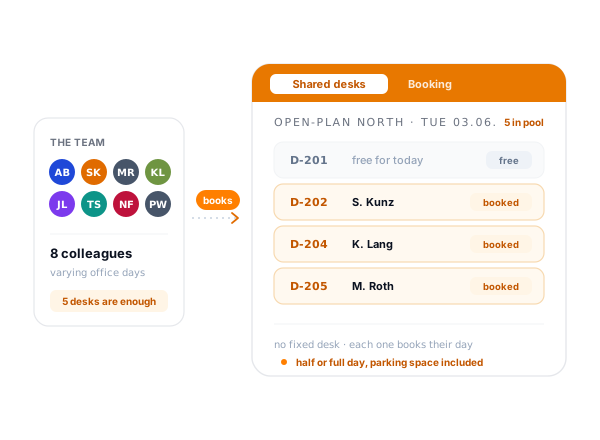
Desk sharing turns the shout-out into a booking: everyone reserves their desk in advance, and everyone sees beforehand who is coming and what is free.
The core
In hybrid teams the whole workforce is rarely in the office at the same time. Anyone who still keeps a fixed desk for every person pays for floor space that stands empty most of the time. Desk sharing turns that around: a desk no longer belongs to one person but is shared. Whoever comes in books it beforehand, often just for the two or three days they are there.
teamspace handles this as a booking, not as a graphical seating plan. The released desks sit in categories; a member of staff picks the day, the desk and, if needed, a parking space. That turns a half-empty open-plan office into a floor that matches actual demand. How the office and home office work together is explored in more depth under hybrid work.
The principle
With fixed assignment, every desk belongs to one person, and on every office day half of them stand empty. In a pool the same people share fewer desks, because everyone only books the day they are actually in.
Aus fünf fest zugeteilten Tischen werden drei geteilte, die jeden Tag voll gebucht sind.
Booking
A booking is created in a single step. The member of staff clicks the day, picks a desk and, if needed, a parking space, half day or full day. Booking runs in the browser, including as an installed web app on the smartphone, so it works just as well from the home office as on the move.
If someone leaves earlier or suddenly needs a different desk, they overwrite the day in question and leave the rest in place.
Why desk sharing
Default schedule
Many members of staff have a fixed rhythm: in the office on Tuesdays and Thursdays, otherwise in the home office. For them a default schedule sets, per weekday, which desk is reserved. It repeats every week from a start date, without anyone re-entering it.
Individual days remain freely editable. Whoever deviates in a given week overwrites the day in question and leaves the rest of the schedule in place. That creates a home desk for some and a flexible hot desk for others, in the same pool.
“Time tracking is far simpler and more convenient than in Excel.”

In 15 minutes
Tell us about your office routine: two fixed or five flexible days, tight parking spaces, teams that need to coordinate. After that we'll tell you whether desk sharing with teamspace is worthwhile for you.
From practice
Whether shared desks catch on depends less on the technology than on a few ground rules. The following have proven themselves in many offices, and the software supports those that can be mapped digitally at all.
The same basic equipment at every desk. When every desk has a monitor, a docking station and the same accessories, no desk becomes the favourite and switching is easy. Plug and play is the motto: connect the laptop and get going.
Clean desk policy. Everyone leaves the desk as they found it. Personal belongings go into a lockable locker in the evening, so that no one has to tidy up first in the morning.
Keep data protection in mind. Anyone working with sensitive documents needs a lockable cabinet or a desk that is excluded from sharing. In teamspace an authorised user group per category governs who is even allowed to book which desks.
Self-organisation instead of group chat. The daily coordination of who takes which desk and when does not belong in an error-prone chat history. Through the booking, staff see free desks and their colleagues' schedule and coordinate without asking around.
Free desks
Before booking, a member of staff sees in the workplace overview which desks and parking spaces are free on a given day and which are already taken, for today as well as for the coming weeks. So no one drives to the office and finds no desk.
The same view shows the flip side: on days when hardly anyone books, it is immediately obvious that the floor stays empty. Whoever looks regularly quickly recognises on which weekdays it gets tight and on which there is plenty of space, with no sensors at all, purely from the bookings.
More from workplace management
Desk sharing is one area of workplace management. These adjacent topics share the same desks, bookings and user groups.
Office and home office in one logic, from booking through to coordination within the team.
Learn moreRooms, offices and parking spaces as bookable resources with capacity and equipment.
Learn moreWhoever works in the office or at home records their attendance at the same login.
Learn moreCategories
Not every desk is the same. A category bundles desks of one kind, such as an open-plan office, a single office or the underground car park. Within the category, each desk and each parking space is its own resource with its own characteristics.
That way someone uses a filter to find the desk that fits their day, rather than booking blindly.
Parking space
In workplace management the parking space is its own bookable resource, not an appendage of the desk. Whoever needs one reserves it for the same day as well, half day or full day. At sites with tight parking spaces, this takes out the daily hunt for a space.
Parking spaces, too, live in categories with characteristics: covered, with an EV charging point or reserved for a particular group. When booking, a member of staff sees which spaces are free and what equipment they have.
The comparison
Anyone who runs office occupancy in an Excel list and by shout-out in the chat knows the daily chaos. Desk sharing with teamspace turns the shout-out into a booking that everyone makes themselves and everyone sees in advance.
Feature
Excel list + shout-out
teamspace
Recommended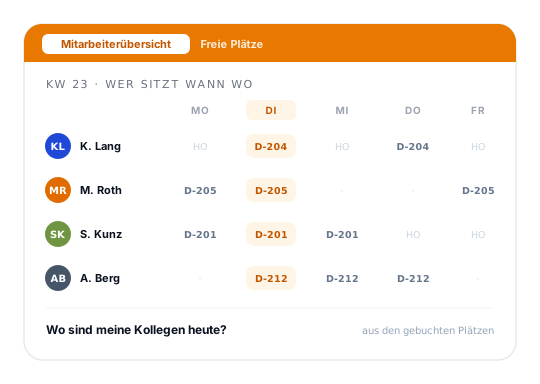
At a glance
Shared desks are one use case of workplace management. How teamspace brings booking, the default schedule, the three overviews and the parking space together in one system is shown in the overview of the workplace management software.
To the workplace management softwareTerms
What the feature language means when it points to desk sharing, categories and the default schedule.
Background
Behind desk sharing, flex office and hot-desking lies the same basic idea: staff no longer have a permanently assigned desk but choose a desk as needed. Ever since hybrid working models became widespread, this has been the obvious answer to offices that are only fully occupied on peak days.
The difference lies in the detail: hot-desking emphasises spontaneous booking on the day itself, whereas a default schedule maps a fixed rhythm. teamspace covers both, because in the same pool one member of staff sets their home desk while another books purely flexibly. Which mix fits depends on the team and on the office size.
The booking and attendance data sit in an ISO 27001-certified data centre in Frankfurt am Main, processed exclusively in the EU. The contracting party is 5 POINT AG, a German public limited company based in Darmstadt. Workplace management is included in every edition and runs in the same system as Teamwork and the core HR functions.
Related modules
Whoever books desks usually also works with time, team and personnel data in the same system. Here are the shortest routes there.
Whoever is in the office records their attendance and project time there, on the same member of staff, in the same login.
Boards, wiki, forum and team calendar for hybrid collaboration. Whoever plans the office day plans the team meeting at the same time.
Personnel file, leave and absences on the member of staff. A person's fixed place of work lives in the same personnel records.
Your questions
You show us how your office is occupied today, we show you what teamspace makes of it. After that you decide whether shared desks are the right way for your team.
In hybrid working models, desks are rarely occupied daily by the whole workforce. Anyone who still keeps a fixed desk for every person wastes office space. Desk sharing solves this with shared desks and a booking system: whoever comes in reserves their desk beforehand, half day or full day.
teamspace maps the released desks as a list in categories, not as a graphical seating plan. A member of staff picks the day, the desk and, if needed, a parking space. Home desks via the default schedule for regular attendance, flexible hot desks for changing days, both in the same pool.
Bookings are made in the browser or via an installable web app on the smartphone. Recurring office days can be set in a single step through the default schedule, while individual days remain bookable differently. Whoever needs to change a booking taps the pencil icon on the day, rather than creating it again.
The workplace overview shows, per day, which desks are free and which are taken, for today as well as for the coming weeks. So no one drives to the office and finds no desk, and on empty days it stands out that the floor is barely used. Occupancy results purely from the bookings, with no sensors.
Are you considering whether teamspace should carry desk sharing in your organisation? In the 15- to 30-minute call we review your office structure and hybrid logic.
Intro call
In 15 to 30 minutes we discuss your office structure and your hybrid logic. You get an honest assessment of whether and how shared desks work for you.