
1
Value over volume
Requests are prioritised by client value (ABC classification), not by order of arrival or volume of the complaint.
Customer care is more than support. It is a lever for retention, follow-on work and reputation. teamspace connects tickets, SLAs, client value and contact frequency so that clients are prioritised by value and served quickly.
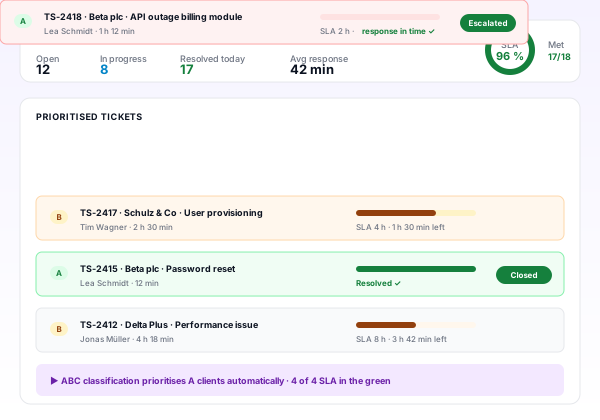
Requests are prioritised by client value (ABC classification), not by order of arrival or volume of the complaint.
Response and resolution times are agreed, measured and steered. Breaches are escalated, not hidden.
Proactive touches with A clients, regular reviews, thematic sessions. Relationship instead of reaction mode.
Incoming tickets, calls and emails are captured centrally, mapped to the client and classified by client value.
A clients with critical SLAs come first. Routine requests follow standard workflows.
Tickets are assigned, worked on and time tracked. Status changes are traceable.
SLA breaches and critical tickets escalate automatically. Ownership is unambiguous.
Ticket resolved and closed, client optionally asked for feedback. Insights feed the knowledge base.
Response time, SLA attainment, ticket volume, effort per client and satisfaction flow into the service dashboard.
Time from request to first reply. Green and red configured per client class.
Time from request to resolution. Core driver of satisfaction and SLA compliance.
Share of tickets within agreed SLA. Green: above 95 percent, red: below 90 percent.
Tickets per period per client. Reveals high-touch accounts.
Hours per period per client. Basis for client profitability and contract decisions.
Days since last touch on A clients. Green: under 30 days, red: above 60 days.
Client value everywhere
ABC classification from sales also drives customer care. A clients are visibly marked in tickets, emails and calls. A missing contact log for an A client over the last 30 days becomes an automatic early warning.
Every ticket shows A, B or C immediately. Service staff know priority without lookup.
An A client with no logged contact beyond the agreed window turns red on the dashboard.
Imminent SLA breaches escalate before the deadline, with owner and escalation chain.
Requests arrive across channels, are not centrally captured, get lost or sit untouched.
Tickets tracked in a list or shared inbox. Linking to clients and owners is cumbersome.
Ticketing tool with status and ownership. SLA is defined, rarely measured.
Ticketing with knowledge base, SLA measured, manual escalation, reports available.
Automated escalation, client value in tickets, SLA forecast, client portal, self-service.
Proactive steering, skill routing, automated contact impulses for A clients, integrated view across tickets, projects and contracts.
| Feature | Classic (ticketing + CRM separate) | teamspace customer care |
|---|---|---|
| Ticket linking | Manual link to clients and projects | Automatic link with client value and project context |
| SLA tracking | Evaluated in spreadsheets, with delay | Live on the dashboard, with thresholds |
| Client value | In CRM, not visible on the ticket | ABC class directly on ticket, email and call |
| Escalation | Manual, often too late | Automatic before SLA breach, with owner |
| Knowledge base | Separate, not linked to tickets | Integrated, articles spawn from tickets |
| Self-service | Not available | Client portal with tickets, status, documents and feedback |
Helpdesk, SLA management, knowledge base, client portal.
Learn moreTickets, status, owners, escalation, multi channel.
Learn moreResponse and resolution times, measurement, thresholds.
Learn moreClient portal with ticket overview and knowledge base, password protected.
Learn moreTickets against maintenance contingents or billed individually.
Learn moreOpen, comment and close tickets from Teams.
Learn moreIn many firms customer care is run reactively: the loudest voice gets served first. That creates two structural problems. First, A clients with high strategic value are sometimes served the same way as low-volume C clients, even though their contribution is much higher. Second, hidden service cost emerges because effort is not captured systematically and tied to contracts.
A structured customer care process prioritises by client value, measures response and resolution times against agreed SLAs, captures effort per ticket and client, and ties service to contract model and billing. That turns service into a steered value driver instead of an invisible cost.
Maturity is exposed by four questions: are all requests captured centrally and linked to clients, are SLAs measured rather than merely agreed, is client value visible in every service context, does the system escalate automatically when SLAs are at risk?
If answers are mostly ‘no’ or ‘partially’, you are typically on Level 1 or 2. The jump to Level 3 or 4 improves SLA attainment, reduces leadership escalations and lays the foundation for profitable maintenance contracts.
A high-maturity customer care process is more than a ticketing tool. It knows client value in every interaction, measures response and resolution time, escalates automatically when SLAs slip, captures effort fully and connects service with contract and billing. Helpdesk becomes a true steering discipline.
In a 15 to 30 minute requirements call we score your customer care process against the maturity model and outline the next step toward higher SLA attainment and retention.