
1
Capacity
Availability, working time, leave and absences in one view. The basis of every resource plan.
People are the most important resource in services, and the biggest cost driver. teamspace connects availability, skills, utilisation and compensation so that the right people with the right skills work on the right projects.
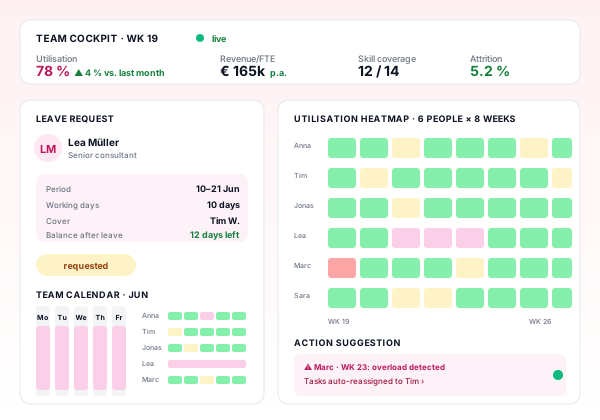
Availability, working time, leave and absences in one view. The basis of every resource plan.
Skills, certifications, languages, tools. Enables staffing by competence instead of gut feel.
Compensation models, commissions, objectives, feedback. Connects contribution and reward.
Employee record, contract, weekly hours, skills and certifications are maintained centrally.
Availability per person is computed from contract, leave, sickness and special times, automatically and daily.
On new projects, suitable people are assigned by skills and availability, conflicts are visible.
Staff log time, tasks and expenses. Managers approve. Delegation rules prevent bottlenecks.
Utilisation, margin and contribution are analysed per person. Foundation for development talks and commission models.
Skills extended, certifications updated, career paths documented. People stay current, the firm stays competitive.
Billable hours over available hours. Green: 70 to 85 percent, industry dependent. The most important steering KPI in services.
Total revenue divided by headcount. Measure of scalability and productivity, typical 100 to 250 thousand EUR per year.
Billable hours over total hours. When it drops, hidden project losses appear.
How busy will we be in the next 1 to 6 months? Source: project plan, resource plan, pipeline.
Which skills do we have, which do we need? Surfaces gaps long before the engagement starts.
Share of people leaving per year. Direct impact on knowledge, capacity and follow-on cost.
Utilisation forecast
The utilisation forecast combines three sources: current project commitments, planned resourcing and weighted sales pipeline. The result is a forward view that exposes bottlenecks (not enough capacity) and idle time (not enough work) early.
Who is critically loaded over the coming weeks, who has gaps? Weekly granularity.
Which skill is tight, which has slack? Foundation for sales focus, training or hiring.
Which area has growth headroom, which needs people? Strategic steering instead of reaction.
Capacity, leave and skills are neither documented nor planned. Staffing happens by phone call.
Spreadsheets for leave, availability and skills. Utilisation calculated after the fact.
HR and time tracking in place. Skills documented, rarely used for staffing.
Resource planning integrated with project plan and time tracking. Utilisation measured continuously.
Utilisation forecast, skill-based staffing, commission computation, digital payroll preparation.
Real-time steering, automatic staffing proposals, skill gap analysis, integrated career paths and compensation.
| Feature | Classic (HR + spreadsheets) | teamspace workforce process |
|---|---|---|
| Availability | Leave list in spreadsheet, separate from contract | From contract, leave, sickness, special times, automatic |
| Utilisation | Manual, often weeks old | Live, with multi-month forecast |
| Skills | In CVs, not searchable | Structured, usable for staffing |
| Commissions | Spreadsheet calculation at quarter end | Automatic from sales and project data |
| Payroll preparation | Export hours, add manually | Hours, expenses and bonuses pushed automatically |
| Employee record | Paper or network drive | Digital, role based, compliance ready |
Employee record, contracts, skills, leave, sickness.
Learn moreDocuments, contracts, certifications, role-based access.
Learn moreRequests, approvals, balances, delegation, team calendar.
Learn moreResources across all projects with utilisation and conflict detection.
Learn moreHours, bonuses, expenses for payroll, with DATEV handover.
Learn moreWorking time and project time, legally sound, with approval and analytics.
Learn moreIn professional services 70 to 85 percent of cost sits in people. People are also the resource value creation springs from. Treating the workforce process as HR administration squanders the biggest lever in the firm. Typical symptoms when steering is weak: utilisation swings uncontrollably, skills live only in some managers’ heads, commission models create frustration instead of motivation, attrition silently costs multiples of an acquisition each year.
A professionally steered workforce process connects capacity, competence and motivation in one data model. The result is a clear picture of who is available with which skills, where skills are missing and where the next bottleneck is brewing.
Maturity is not the HR tool you use. It comes down to four questions: is availability per person current and system-side, are skills structured and usable for staffing, is utilisation actively steered rather than reported retrospectively, are commissions and payroll preparation integrated with the data set?
If two or more answers are ‘rather no’, you are typically on Level 1 or 2. The jump to Level 3 or 4 pays back twice: higher utilisation and lower attrition.
A high-maturity workforce process combines soft and hard steering. Availability and skills are structured and available, utilisation is steered ahead of time, compensation models are transparent and computable, payroll preparation is digital. People experience transparency, leadership gains steerability.
In a 15 to 30 minute requirements call we score your workforce process against the maturity model and identify the biggest lever for utilisation and retention.