
Project management basics: how to control delivery, budget and quality
The term 'project management' (in the narrow sense: project control) appears in many areas of project work. There is no single definition or clear boundary to related terms such as project controlling or project leadership.
What project control means
The term “project control” appears in many areas of project management. There is no single definition or clear boundary to related terms such as “project controlling” or “project leadership”.
The term originally comes from construction management. In Germany, it was introduced in 1977 by the Honorarordnung für Architekten und Ingenieure (HOAI). It included tasks such as creating schedules and payment plans, coordinating project participants, and aligning with the client. With the 2009 revision of the HOAI, the formal service description was discontinued, but the concept lives on across industries.
Goal and tasks of project control
Project control follows project planning. It runs across the entire project. Its core goal is to keep the central project metrics (actuals such as duration, cost and results) as close as possible to the planned values.
So project control is about making sure the plan actually plays out, the goals are met and none of the boundary conditions (budget, schedule, scope) are violated. To get there, project controllers have a wide range of tasks.
Who is responsible for project control?
Project leadership is responsible for the actual execution of the project. It issues work instructions and follows the project plan. In many cases project leadership also takes on the tasks of project control. But not always.
For larger and more complex projects it often makes sense to separate the two. Project leadership organises and runs the actual work. Project control focuses on monitoring the project and keeping it on the broad course.
The key distinction: project leadership has decision-making and directive authority, project control does not.
The method: a control loop
Project control works as a control loop of monitoring and steering. It draws on the tools of project controlling to measure project success, derives recommendations and hands them to project leadership.
The three most important dimensions are time, budget and scope/quality. Together they form the “magic triangle” of project management. The sections below show the tools and methods you can use to steer projects effectively.
Keeping deadlines and milestones
Projects running late is a common ailment. Sometimes even the best project control cannot prevent it. But there are many ways to keep the risk of delay as small as possible.
Monitor project progress
Project progress is a percentage that tells you how much of the project work is already done. In the simplest case, divide completed work packages by total work packages. This assumes packages are roughly equal in size — if not, weight them.
The much easier way is to use software like teamspace. It calculates progress automatically from the progress of individual work packages, which team members maintain in the system as they complete tasks.
With this information you can compare current progress to plan at any time. You quickly see whether the project is on schedule. If there are delays, investigate the cause — missing material, sick team, slow approval cycles — and accelerate where possible.
Capture and analyse project time
Many projects are planned in detail. Predecessors and successors are well-defined. The full potential of such planning, however, only unfolds when actual time (not just planned) is also captured.
If you only give planned values without tracking actual effort, it is like drawing a detailed hiking map but leaving the GPS at home — you cannot tell where you are.
To stay on top during the project, capture the working time team members invest in each task. Excel works at a basic level, but specialised software like teamspace saves time and nerves.
With project time tracking team members log time online against a work package. Project control can review and compare to plan. It is particularly comfortable when time budgets are given as capacities up front — capacity planning in teamspace helps with that.
If project time on a package is significantly above plan, you can investigate the deviation immediately. Without capacity planning and time tracking the delay might only become visible after the final deadline has passed.
Track milestones
Milestones are central to every project — they mark the key checkpoints. If a milestone is missed or hit late, significant follow-on cost arises, up to project cancellation.
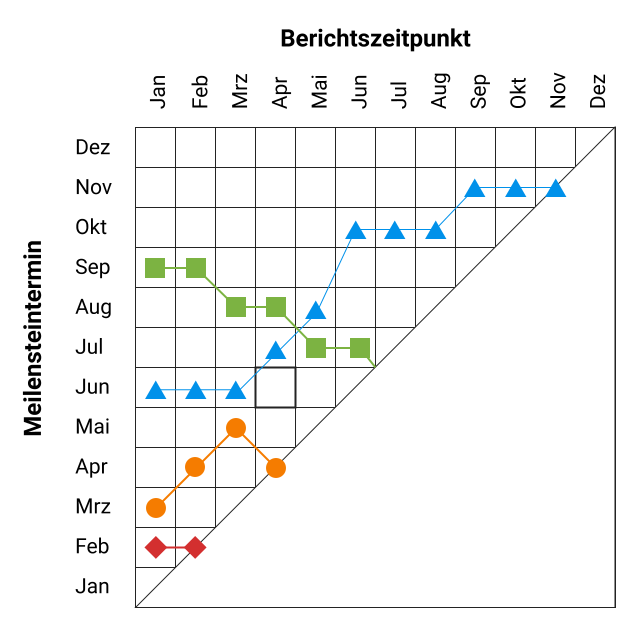
A useful tool for spotting delays early is the milestone trend analysis. Plot the planned milestone dates on a chart. Regularly (e.g. at monthly project meetings), reassess whether the date is still realistic. Plot the updated date too. Over time you get a chart showing how milestones shift along the time axis.
If the line for a milestone keeps drifting upward, it is going to be missed. If it stays flat, you are on track.
Staying within budget
Project margin is typically defined by the order value minus the project cost. Higher cost directly hits margin — so it pays off to watch costs.
Capture project expenses
During a project, resources often need to be bought — material or external staff. Only if these expenses are captured systematically can you give a reliable statement about the project cost.
Invoices arrive in different ways: PDF by mail, postal letter, receipt with a delivery. Bookkeeping is easiest when all receipts live in one digital place.
A cloud solution like teamspace fits this well. Project leads can store or photograph receipts and upload them anywhere, any time. Digital receipt capture makes documentation quick. Once in the system, receipts are linked to projects and feed into the project P&L automatically.
Calculate the contribution margin
Once costs are captured, the contribution margin is one short step away. Although it is a central business metric, it is often neglected in projects — usually because people shy away from systematic time and cost capture.
Project control software calculates contribution margin automatically. It shows how profitability evolves as the project progresses.
Ensuring scope and quality
Scope and quality of the project result determine whether the customer is happy. Customer expectations and supplier commitments are documented at the start in requirements and specification documents. But throughout the project, regular open communication is what keeps the customer aligned and prevents the project from drifting in the wrong direction. This saves nasty surprises at handover.
Keep project documentation alive
Project documentation is not an end in itself — it helps in several ways:
- You find relevant information quickly.
- You give precise updates to project stakeholders.
- You avoid misunderstandings and create legal certainty.
Documenting is unpopular because it costs time. Counter that by making it easy for team members and by checking regularly that documentation obligations are met.
Project control software like teamspace ships templates that the team can edit directly online — Word, Excel, PowerPoint, images. Optionally, work package status can be tied to documentation.
Manage quality
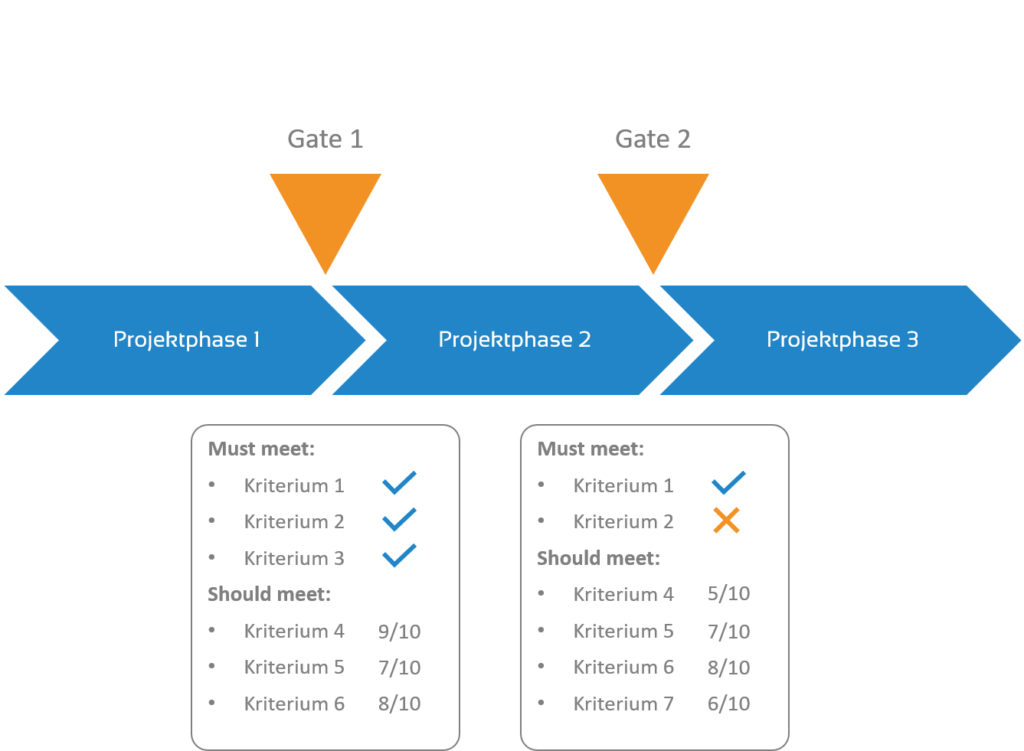
Good project documentation also helps manage scope and quality. A well-known method is the stage-gate model, developed by Robert Cooper in the 1980s. Originally aimed at product innovation, the core idea applies to project management more broadly.
The stage-gate model puts strong focus on result quality. The project process is split into stages. After each stage there is a gate. The quality of the result so far is reviewed against predefined criteria. Project control then decides whether to continue, rework or abort.
Criteria split into “must-meet” and “should-meet”. Must-meet criteria are yes/no — if any fail, rework is mandatory or the project is cancelled. Should-meet criteria are scored 0 to 10. The goal is to hit every must-meet and score well on should-meets.
Software for project control
Project control is a highly data-driven control loop. To run it effectively and professionally, an all-in-one solution for project management is the best choice. With such a system all relevant data is captured quickly. Via the cloud, the team can access it any time and anywhere. All key metrics are calculated automatically.
Looking for project control software? Test teamspace with a 14-day requirements check, free of charge and without obligation. For questions on the software or on project control in general, reach out to our consulting team.
Read on
- Project controlling
- Earned-value analysis
- Capacity planning
- Multi-project management
- Project time tracking
Reviewed in a requirements check
You have questions on this topic? In a 15- to 30-minute meeting we discuss your specific requirements, free of charge and without obligation.
Software that fits your setup?
In a 15-minute meeting we look at your requirements together and give an honest first opinion.