teamspace
Project management

Tips for successful project execution

Project execution covers the delivery of all project tasks from start to end. Planning typically is not counted in. Beyond delivery itself, administration and controlling also belong to execution.

Martin Moosbrugger 5 min read

What does project execution mean?

Project execution covers the delivery of all project-related tasks from start to end. Project planning typically is not counted in.

What belongs to project execution?

Beyond the actual delivery (completing the individual work packages), administration and controlling tasks also belong to execution. They make sure the project runs to plan and the customer is happy with the result. The most important components are:

  • Project documentation
  • Project controlling
  • Project billing

Project documentation

Documentation is often treated as a chore — it seems to double the effort, first the actual work, then the documentation. A well-documented project, however, is valuable for two reasons. First, it makes the work easier for other project participants — they can see what has been done and pick up faster. Second, project leads with thorough documentation can answer customer questions accurately at any time, even critical ones. Finally, documentation creates legal certainty for both sides.

Project controlling

Project controlling continuously checks whether the project is running to plan. It uses a set of instruments:

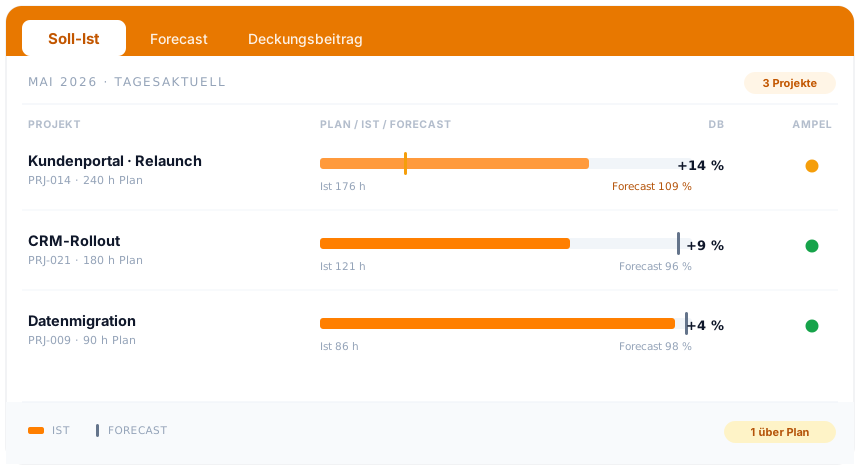
  • Plan vs. actual comparisons
  • Contribution margin analysis
  • Earned-value analysis

The purpose is to catch deviations from plan early — or, even better, prevent them. Deviations show up in three areas:

  • Schedule deviation: the project takes longer than planned.
  • Cost deviation: the project costs more than planned.
  • Performance deviation: quality or scope deviates from plan.

All three are problematic — they may increase project effort substantially.

Project billing

Project billing is an administrative activity tightly linked to the project. For larger projects, billing often happens in several instalments tied to project progress. For billing to run smoothly, payment terms should be agreed clearly with the customer before the project starts. When is which payment due? What conditions need to be met? How much is it? Which terms apply? This avoids uncertainty and unpleasant follow-up questions.

Tips for successful project execution

Tip 1: Communicate with every stakeholder

Communication plays a leading role in project execution to avoid misunderstandings. It applies inside the team and with the customer.

Many projects fail not in execution but in communication and false expectations. “Expectations are one-sided contracts the other party doesn’t know about,” says Karlheinz Wolfgang, naming the biggest weak spot of non-communication.

Anything the customer or a team member merely expects without articulating it can lead to surprises later. So:

  • State clearly what you expect as the result of the project or a single step.
  • Repeat other stakeholders’ expectations (especially the customer’s) in your own words and ask whether you understood them correctly.
  • Communicate the current status regularly, transparently and proactively. That avoids false expectations and creates shared knowledge.

Tip 2: Automate admin processes as much as possible

Wherever people are involved, errors happen. Automate routine admin as much as you can.

Project teams often counter this with: “we’re in constant alignment anyway”. In practice that looks like: the project lead emails accounting to trigger the next invoice. Follow-up questions are clarified by phone. Accounting then writes the invoice in Word or Excel, looks up customer contact data, and sends it by mail.

The process is laborious and error-prone:

  • What happens when one of those people is sick or on vacation?
  • Writing invoices in office programs eats time.
  • Many contacts, programs and media breaks easily produce transcription errors.
  • Are the customer’s contact details still current?

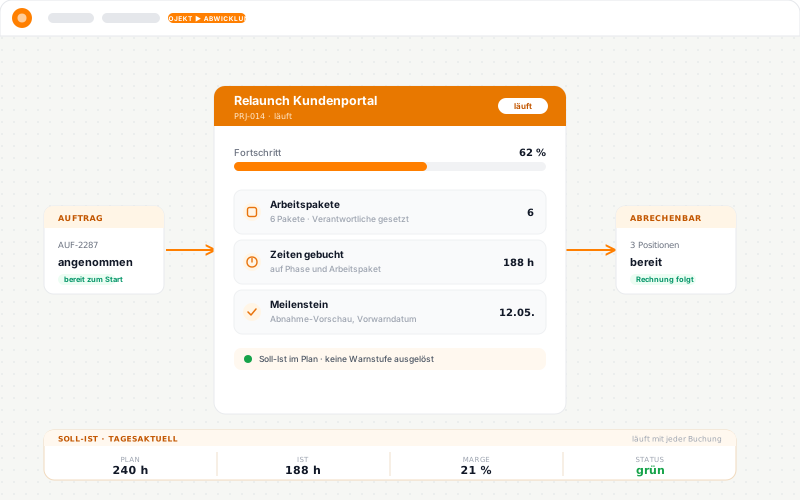
Better is a software solution like teamspace that triggers the billing process automatically and bundles it in one application. As soon as the project lead marks a relevant sub-project as done, the related items appear as billable on the order. One click generates the invoice in the configured layout. Customer details come from the CRM, and the invoice can be dispatched directly from the system.

This automated solution saves time, reduces error sources and creates a single place of truth for all project and billing questions.

Tip 3: Document project activities and results

Bundle your project documentation in one place: activities, time, cost, results and more. Comprehensive documentation helps in several ways:

  • Team members can build on what is already documented. Acceptance reports, photos, project gates — all of it can live in a suitable cloud solution. Instead of asking a colleague, people access the digital file library and find what they need. The teamspace software organises file storage along the work breakdown structure, so documents sit on the right work package.
  • Documented project effort (time, cost) makes success analysable. If your team captures every hour they work, you get a precise picture of the labour cost. Material and other cost types can also be recorded digitally and used to calculate contribution margin. The analysis reveals how much profit a project actually generated.
  • Delivered work is easy to prove. A timesheet or activity report automatically aggregates the relevant times. They can also be charged out via an external rate.

Tip 4: Keep the overview at all times

When projects are not run from a central place, the overview is quickly lost. Important documents end up scattered. This makes project control harder and targeted analysis nearly impossible.

Bundle every document — and the related processes — in one place. A shared platform creates overview and should be the first stop for your team. There they find the project plan, their resource plan and the documentation. People with the right permissions also have access to invoices, project hours and budget planning.

Smart PM software like teamspace makes the data and processes work together. A team member is sick? teamspace flags the gap in the resource plan. Re-distribute the work and the affected people automatically get a notification.

The system supports project control as well as project controlling. By bundling every relevant figure in one place, you can run live plan-vs-actual comparisons, keep an eye on labour costs and analyse contribution margin.

Only if you keep the overview at all times will you notice in time when something is off plan and can course-correct. End-of-project success analysis also becomes much easier.

Try teamspace for project execution

Successful projects start with good planning. Leave nothing to chance and try out the teamspace software on your project. teamspace unites project planning and execution in one system.

Read on

Reviewed in a requirements check

You have questions on this topic? In a 15- to 30-minute meeting we discuss your specific requirements, free of charge and without obligation.

Share article:

Software that fits your setup?

In a 15-minute meeting we look at your requirements together and give an honest first opinion.