teamspace

All-in-One Software or Silo Solutions: What Suits a Professional Services Firm?

One system for everything, or the best tool for each job? Both paths have their place. This comparison sets out the decision criteria: when an integrated system like teamspace wins, and when individual specialist tools stay the smarter choice.

Often overlooked

The cost of silo solutions rarely shows up on the invoice.

The licence price of individual tools looks cheap. The real costs arise alongside it: in maintaining the interfaces, in entering the same customers several times over, in hunting for figures that no single system holds in full.

  • Duplicate data entry: customer and project live in the CRM, the time logging tool and the accounts at once, and nowhere fully up to date.
  • Interfaces: every connection is its own contract, its own update, its own source of error.
  • No overall view: utilisation and margin only emerge once someone merges the lists, usually in hindsight.
This is what one system looks like

In brief

All-in-one software brings together what belongs together.

All-in-one software brings projects, CRM, time logging and billing together in one system on a shared data foundation. Silo solutions are individual specialist tools, one per job, connected through interfaces or by export. "Best of breed" means the same approach built from separate tools.

The rule of thumb is simple: the more closely your tasks hang together, for example when a logged hour becomes an invoice, the stronger the case for one system. The more self-contained a specialist discipline is, and the more depth it needs, the more a dedicated tool pays off.

  • All-in-one: one data foundation, one login, one set of reporting, no interface upkeep.
  • Silo solutions: maximum depth per tool, but at the cost of duplicate data entry and integration effort.
  • What counts is not the number of features, but how tightly your processes hang together.

What matters

The criteria compared side by side.

Eight points where an integrated system and separate silo solutions differ in the day-to-day of a professional services firm. On two of them, the silo solutions win.

Feature

Silo solutions

One system (teamspace)

Recommended
Hours become invoice line items without an export
Export or manual
Customer and project entered once, connected everywhere
maintained per tool
Utilisation and margin up to date from a single source
from several lists
One login, one permissions model, one set of reporting
Interfaces have to be maintained and kept up to date
ongoing
not needed
Contracts, updates and invoices per vendor
several
one contract
Maximum functional depth in a specialist discipline
broad and solid
Free choice of the best individual tool for each job
modules of the suite

The decision

How tightly your tasks hang together is what tips the balance.

The choice is not a matter of taste. It hangs on one point along a single axis: the more closely hours, projects and invoices interlock, the stronger the case for one system.

Lose gekoppelt Eng verzahnt

Ein Spezialwerkzeug deckt fast alles ab

Kipp-Punkt: aus Stunden werden Rechnungen

Projekte, Zeit und Rechnung greifen ineinander

Links auf der Achse

Insellösungen bleiben sinnvoll

  • Eine Disziplin steht klar im Zentrum, der Rest ist Beiwerk.
  • Diese Disziplin braucht maximale Funktionstiefe.
  • Teams arbeiten unabhängig, ohne gemeinsame Kunden- und Projektdaten.
Rechts auf der Achse

Ein System wie teamspace gewinnt

  • Aus erfassten Stunden werden ohne Export Rechnungen.
  • Mehrere Teams teilen dieselben Kunden und Projekte.
  • Auslastung und Marge sollen tagesaktuell aus einer Quelle stehen.

Nicht die Zahl der Funktionen entscheidet, sondern wie eng Ihre Prozesse zusammenhängen.

A clear verdict

When silo solutions make sense, and when one system wins.

Silo solutions make sense when

  • A single tool covers almost the entire need and the rest is incidental.
  • A specialist discipline needs maximum functional depth that a generalist cannot offer.
  • Teams work largely independently, without shared customer and project data.
  • IT resources are in place to maintain the interfaces over the long term.
Recommended

One system wins when

  • Hours, projects and invoices hang together and should interlock without an export.
  • Utilisation and margin should stand ready from a single source, up to date.
  • Duplicate data entry and interface upkeep cost time today.
  • One login, one permissions model and shared reporting are wanted.

Decision aid

How to tell what suits you.

The more points on the left apply, the more a system pays off. The more on the right, the more silo solutions stay sensible.

Points to a system

  • Logged hours become invoices.
  • Several teams share customers and projects.
  • Utilisation and margin should stay up to date.
  • Duplicate entry and exports are a nuisance today.
  • No one should have to look after interfaces.

Points to silo solutions

  • A single discipline clearly sits at the centre.
  • That discipline needs maximum functional depth.
  • Teams work independently of one another.
  • Existing specialist tools are deeply embedded.
  • IT resources for integration are in place.

The second question

A simple tool is quick to set up, but it has a ceiling.

Alongside the question "one system or many" sits a second one that is easy to overlook: how far does the tool you choose actually carry you? Lightweight tools are quick to get going and cover one job cleanly. As soon as you want to automate steps or connect further areas, their room runs out, and a move to a different program follows, with a data migration and fresh onboarding.

teamspace starts just as simply, but without that ceiling. You begin with manual entry and raise the level of automation step by step, in the same system and on the same data. The choice between "simple or powerful" turns into a sequence.

  • Start manually: time, quotes and invoices by hand, as lean as a lightweight tool.
  • Rules take over: invoice proposals, recurring invoices and dunning run automatically.
  • End to end: from ticket through contract to a paid e-invoice, with no intermediate steps.

No obligation

What makes more sense for you, we settle in 15 minutes.

Bring along the tools you use today and a typical workflow. Together we look at whether one system saves you work or whether your silo solutions stay the better choice.

What sits inside one system

If one system is the direction: this is what teamspace covers.

Nine modules on one data foundation. You switch on what you need today and extend later, without losing data or configuration.

Project management

Projects with budget, phases and team, from the accepted quote through to billing. Plan and actual stand side by side.

Learn more

Time logging

Hours land on the right project and the right phase, in the browser or as an installable web app.

Learn more

Invoicing software

Logged hours, flat rates and travel costs become the draft invoice, with ZUGFeRD, XRechnung and DATEV export.

Learn more

CRM software

Contacts, quotes and sales on one customer file, connected to projects, tickets and invoices.

Learn more

Service desk

Ticket system, helpdesk and customer portal in one interface, with SLA monitoring and Microsoft Teams integration.

Learn more

HR software

Personnel file, absences and working time on the same master data, with handover to payroll.

Learn more

Teamwork

Tasks, wiki, files and appointments on the project, so collaboration stays in the same system.

Learn more

Workplace management

Desk sharing, room and resource booking for hybrid teams, aligned with attendance and calendar.

Learn more

Quality management

Controlled documents, approval routes and actions with a traceable history, in the same system as the work.

Learn more

Made in Germany

One system pools sensitive data, so where it sits matters.

When projects, hours, fee rates and customer contacts come together in one system, that system belongs in German hands. teamspace is developed in Darmstadt, run in Frankfurt am Main and offered under German law, since 1999 and without outside capital.

  • Hosting in Frankfurt

    Run in an ISO 27001-certified data centre, with processing in the EU only.

  • GDPR and GoBD

    Both standards part of the architecture from the start, not bolted on afterwards.

  • Over 20,000 users

    Around 400 customers across the DACH region trust teamspace, from five to 250 staff.
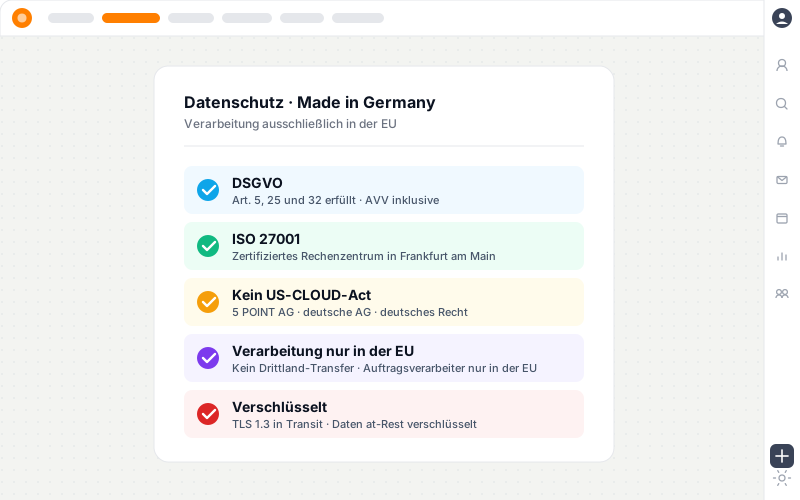
Compliance card with five facts: GDPR, ISO 27001 in Frankfurt, no US CLOUD Act, processing in the EU only, TLS encryption.

Built for

Which professional services firms teamspace is built for.

teamspace is built above all for management consultancies and IT service providers, and goes on to cover IT consultancies, systems houses, agencies as well as architecture and engineering practices with sector-specific features.

Management consultancies

Engagement structure, fee models, consulting days and utilisation across practices and locations.

Industry page

IT service providers

Project and ongoing operations in one system: every hour lands on the right contract, whether project, maintenance or ticket with SLA.

Industry page

IT systems house

Projects, managed services, tickets and maintenance contracts on one platform, with SLAs and renewals.

Industry page

Agencies

Budget management, media budgets, freelancer coordination and creative operations with mixed billing.

Industry page

Architecture and engineering practices

Work phases under HOAI, hour accounts, flat-rate contracts with addenda and travel expense billing.

Industry page

“Staff in both support and project planning can see orders and invoices. That was not possible before.”

A+W Software GmbH, a manufacturer with its own support team: support and project work in one system instead of separate silo solutions.
A+W Software GmbH

Frequently asked questions about all-in-one and silo solutions

What is the difference between all-in-one software and silo solutions?
All-in-one software brings several jobs such as project management, CRM, time logging and billing together in one system on a single data foundation. Silo solutions are individual specialist tools, one per job, connected through interfaces or by export. The term best of breed means the same approach built from separate tools.
Is an all-in-one solution worth it even for small teams?
As soon as several people work on the same customers and projects and hours become invoices, one system saves the export between tools and keeps the data consistent. For very small teams with only one central job, a single tool may be enough.
Do I lose functional depth with one system compared with specialist tools?
In a single, very specialised discipline, a dedicated tool can go deeper. For most project-based professional services firms, the depth of an integrated suite is sufficient, and the gain in end-to-end flow weighs more heavily than a rarely used specialist feature. Where one discipline sits at the centre and needs maximum depth, a silo solution stays sensible.
What happens to our existing tools?
A switch rarely happens all at once. The usual approach is to start with the area that hurts most today and replace further tools step by step. Master and project data can be taken over from Excel or legacy systems. Some specialist tools are deliberately kept and connected through the interface.
What about interfaces between silo solutions?
Interfaces are the sore point of the silo approach: every connection has to be set up, maintained and kept in step with updates. In one system this effort falls away for the modules it contains, because they work on the same data foundation. For external tools, a REST API and a DATEV export are available.
Who is teamspace the right choice for, and who not?
teamspace suits project-based professional services firms whose hours, projects and invoices hang together, typically with around 10 to 100 staff. It is a poorer fit for pure to-do teams without billing, for inventory management and trade with stock, and for production and manufacturing with materials management.
Isn't a simple specialist tool enough if we want to start small?
To begin with, a simple tool can be enough. The difference shows over time: a lightweight tool covers one job but hits a ceiling as soon as you want to automate or connect further areas, and then a change of program is due. teamspace lets you start just as simply and raise the level of automation later in the same system, from manual entry to end-to-end billing, with no switch and no data migration.

Introductory call

One system or several tools?

In a 15 to 30-minute introductory call we look at the tools and workflows you use today and tell you which path saves you more.