
New leave review for capacities
Project-heavy companies know the problem: leave season hits and projects get tight because too many team members are out. teamspace solves it via leave managers per capacity.
No more staffing bottlenecks caused by leave
Companies that work on a project basis know the problem. Leave season arrives and suddenly some projects get tight, because too many team members are on leave at the same time. The bottleneck arises because line managers or HR staff, who typically approve leave requests, do not know how capacities stand on the projects the employee is involved in.
Some companies solve this by having the HR department look up the affected projects and ask the capacity owners manually whether the leave request can be approved. However, this leads to a high time investment and cumbersome approval processes. An automatic solution, such as the one teamspace offers, is better.
Leave managers for capacities
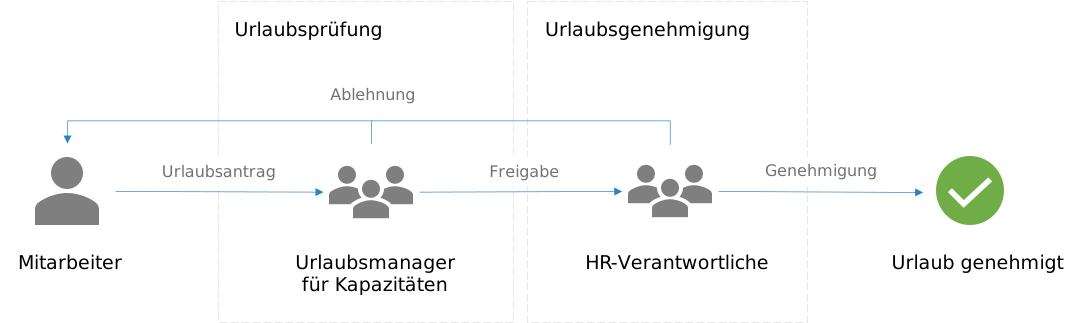
Since September 2022 you have been able to enter one or more leave managers for each capacity. They are responsible for reviewing incoming leave requests and approving or rejecting them. Such a review is due whenever an employee requests leave for a period in which they are also allocated to that capacity.
Whenever this happens, the leave manager automatically receives a notification about the leave request. They can now check whether the leave leads to a staffing bottleneck or not. If the leave manager grants approval, the request automatically moves on to the HR department for the final sign-off of the leave.
The review precedes the approval. Beyond leave managers, you can also select other user groups within the company that are authorised to review. If desired, multiple review stages are even possible. A distinction is always made between a standard check and a validation check. Only in the latter case is consent mandatory for approval.
Read on
Does this fit your requirements?
Do you have questions on this topic? In a 15- to 30-minute meeting we discuss your specific requirements, free of charge and without obligation.
Software that fits your setup?
In a 15-minute meeting we look at your requirements together and give an honest first opinion.