teamspace

Cost centre accounting for service firms that puts overheads where they belong.

Cost centre accounting shows in which part of a company costs arise, and distributes overheads such as IT, administration and management to the departments that sell work. In teamspace an allocation rule on the cost centre does this, every month on its schedule.

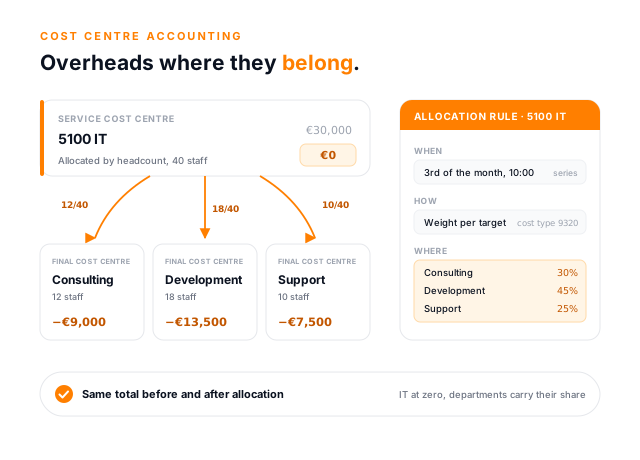
Cost centre accounting as a light concept illustration: at the top the service cost centre 5100 IT with 30,000 euros, allocated by headcount down to zero, below it three orange arrows to the final cost centres Consulting with 12 staff and minus 9,000 euros, Development with 18 and minus 13,500 euros, and Support with 10 and minus 7,500 euros, alongside an allocation rule card with the fields When, How and Where.

An example

30,000 euros of IT costs, and no department carries them.

IT looks after every department, and its costs sit on cost centre 5100 IT. Without an allocation every department looks more profitable than it is. A rule on IT distributes the costs by headcount. Monthly figures, simplified, in euros.

Consulting, 12 staff
+40,000 before allocation, −9,000 IT share, +31,000 after
Development, 18 staff
+25,000 before allocation, −13,500 IT share, +11,500 after
Support, 10 staff
+5,000 before allocation, −7,500 IT share, −2,500 after Only now does it become visible: support does not pay its way.
IT, cost centre 5100
−30,000 before allocation, +30,000 distributed, 0 after
Total
+40,000 before and after The allocation only distributes. The company result and the projects are untouched.

Structure

Cost centres form a tree, and postings go to the leaves.

Areas such as '5000 Administration' break down into individual cost centres. An allocation rule can target single cost centres or a whole subtree. The type is part of the master data and decides how a cost centre counts.

Final cost centre A department that carries costs and sells work, such as consulting, development or support. Its balance stays after the allocation.
Service cost centre A department that works for others, such as IT, administration or management. It collects amounts, and its allocation rule passes the balance on to other cost centres, after which it stands at zero. Cost objects can be set up as service or final objects in just the same way.
Salary cost centre A technical clearing account for personnel costs. Time entries relieve it and the remainder goes to the projects. It is hidden and counts in no total.

The allocation rule

A rule answers four questions: when, what, where, how.

Every cost centre and every cost object has its own 'Allocation rule' tab in the detail manager. Once set up, the distribution runs on its schedule, each time according to the current rule.

  1. 1

    Schedule and series

    When

    At the push of a button or on a recurring basis: the next run is set with a date and time and repeats through a series rule, for example the 3rd of the month at 10:00.

  2. 2

    Source and cost type

    What

    The source and the cost type to be distributed. It is pre-filled with the CM II of the previous period. The allocation also gets its own cost type, so the movements show at once where an amount came from.

  3. 3

    Targets by filter

    Where

    You find the targets with filters, singly or as a subtree. Next to each target are its allocation weight and the share it ends up carrying.

  4. 4

    Allocation weights

    How

    Clear the balance in full or distribute it by allocation weights. Weights are plain numbers, such as headcount: two targets with weights of 1 and 2 receive one third and two thirds, and decimals are possible. teamspace deliberately does not ask for fixed percentages, because when a filter determines the targets, the number of recipients is only known at the time of the run.

Methods

Management first, then administration and IT.

Anyone with several service cost centres has to decide in which order to distribute them. With the direct method, each service cost centre distributes straight to the final cost centres, ignoring services between the service cost centres. That is enough for small companies with a clear structure.

The step-down method is the standard in practice. The service cost centres are distributed one after another, and whatever has been distributed gets nothing back. In teamspace you control the order through the rules' schedules:

  • On the 3rd of the month at 10:00, the management rule distributes to administration and IT.
  • At 11:00, administration and IT distribute to consulting, development and support.

Each rule clears its source. After 11:00 all service cost centres stand at zero, and the departments carry their share.

First call

How do you split your IT costs today?

If the answer is a spreadsheet, we will show you in the call what the same split looks like as a rule on the cost centre, and how to build the cost centre tree for your company.

Book a call

Reallocation

For one-off cases, by hand.

A reallocation moves a single amount from one cost centre to another, or from one cost object to another. The original stays unchanged; the reallocation is a record of its own with a reason and a user. A separate cost type for source and target also lets you reclassify, for example a trade fair share from advertising to commission.

A reallocation is not an invoice. If it splits the hotel costs of a trip to two clients, that changes neither the travel expense claim nor what you bill the clients. To pass the costs on to both, you still need two billable cost items or invoice lines. A genuine error, such as the wrong project, is corrected directly in the original posting.

Allocation

For whatever comes round every month.

If the same shift recurs every month, it belongs in an allocation rule. The distribution then runs automatically on its schedule, without anyone having to remember it.

Reallocations and allocations stay within their view: cost centre to cost centre, cost object to cost object. They do not touch the projects.

Internal cost allocation

The salary cost centre shows how much time never reaches a client.

Many service firms value only booked hours at an internal rate in their cost accounting. The actual salary never appears. If Anna Berger takes two weeks' holiday, the figures show 4,400 instead of 7,200 euros of personnel costs. In the final push of a project with 190 hours they show 9,500 euros, although her salary is the same.

Internal cost allocation with a salary cost centre solves this. The salary is posted twice: once to the department that should see it, and once to a salary cost centre. Every project hour booked relieves the salary cost centre and charges the project.

  • Anna, a normal month: 7,200 euros salary, 136 hours at 50 euros each across two projects.
  • The hours relieve the salary cost centre by 6,800 euros, leaving 400 euros.
  • At month end an allocation distributes the remainder across the projects, here 300 and 100 euros.
  • The department sees the real salary of 7,200 euros; the projects carry the hours plus the remaining share.

The balance before the allocation is the interesting part. It shows whether internal cost rates and utilisation fit together. If consulting has 180,000 euros of salaries against 167,500 euros of hours charged since the start of the year, 12,500 euros are missing. A remainder like that means either the cost rate is set too low or too little time is being booked to projects, perhaps because of bench time, sickness above plan or utilisation below plan. A surplus means overtime, high utilisation or cost rates set too high. These are sample figures, but every service firm faces the question behind them.

Because the salary stays in the department, cost centres and cost objects still add up to the same result. Whether you set up one salary cost centre per person or a shared one per team is up to you. For now, you create the salary posting yourself.

“Without teamspace we would be doing a lot of repetitive work for nothing today.”

Recurring work belongs in a rule. In cost centre accounting, that is the monthly allocation on every service cost centre.
avasis unity GmbH

Origins

The cost allocation sheet comes from the factory.

Since the 1930s, German companies have distributed their overheads in the Betriebsabrechnungsbogen, the cost allocation sheet: a table of cost centres and cost types. It was built for materials, machines and production wages. A service firm needs the same logic, but different keys.

Cost allocation sheet in manufacturing

  • Overheads as a surcharge on materials and production
  • Costing is per unit
  • One table, often maintained monthly in Excel
  • Auxiliary cost centres are allocated to main cost centres

Cost centre accounting in teamspace

  • Overheads spread to departments by weightings such as headcount
  • Steering is by project, client and department
  • One rule per service cost centre, running on its schedule
  • Service cost centres go to final cost centres, pools such as servers or licences to projects
  • Personnel costs through the salary cost centre, hour by hour

Plan and actual

Every cost centre shows where it stands in the year.

For every cost centre you plan revenue and costs per month. The 'Plan & analysis' tab in the detail manager sets plan, actual and variance side by side, per month and cumulatively since the start of the year. The overview adds the previous year.

The movements of the same cost centre list all primary and secondary postings. Every reallocation and allocation shows direction, type and counterpart in its line. Anyone who wants to know why IT stands at zero in June will find the allocation and its targets there.

  • Overview with tiles, monthly figures and cost types
  • Master data with type, owner and weighting
  • Plan & analysis with the variance per month

More in controlling

What happens to the distributed costs.

Cost centre accounting distributes. The analysis happens elsewhere.

Cost and performance accounting

The whole system of cost type, cost centre and cost object.

Learn more

Contribution margin accounting

CM I and CM II per project, client and department.

Learn more

Reporting

Staff utilisation, finance and project reports with drill-down.

Learn more

Business steering

How key figures from every area come together for steering.

Learn more

HR software

Internal cost rate per employee, with a validity period.

Learn more

Project controlling

Budget, progress and forecast on the individual project.

Learn more
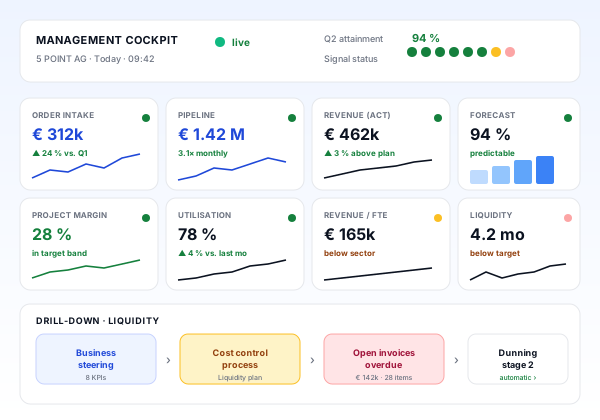
teamspace controlling as a cockpit with key figure tiles for order intake, pipeline, revenue, forecast, margin, utilisation, revenue per employee and liquidity, each with a value, a trend line and a traffic light, and below a path from the key figure down to the individual transaction.

Part of controlling

Cost centre accounting distributes, controlling analyses.

Cost centres, contribution margins and reports all draw on the same postings in teamspace. How the pieces fit together is shown in the overview of the controlling software.

Go to controlling software

What it is about

Cost centre accounting: terms and limits.

Cost centre accounting is the second stage of cost and performance accounting. It asks where costs arise. Direct costs can be assigned straight to a project; overheads such as rent, IT or management cannot. Cost centre accounting collects them in the departments and passes them on. Textbooks speak of main and auxiliary cost centres; teamspace calls them final and service cost centres.

Internal cost allocation is the part that values work done by one department for another. For service firms this is almost always about hours. teamspace charges them through the salary cost centre at the internal cost rate. If development works on a consulting project and is to receive a share of the margin for it, say 20 euros per hour, that share goes between the two cost centres as a reallocation. The project's contribution margin stays the same.

There is one limit. Mutual services, where IT works for administration while administration also works for IT, are distributed one after another using the step-down method, not through a simultaneous equation method. Cost centre planning is included in the office and enterprise editions. teamspace has been developed by 5 POINT AG in Darmstadt since 1999.

First call

Let's build your cost centre tree together.

In the call we work out which departments carry costs, which are distributed and whether a salary cost centre makes sense for you.

Frequently asked questions on cost centre accounting

What is cost centre accounting?
Cost centre accounting is the second stage of cost and performance accounting. It shows in which department costs arise and distributes overheads from areas such as IT or administration to the departments that sell work.
What is internal cost allocation?
Internal cost allocation values the work one department does for another. In teamspace it runs through the salary cost centre: every project hour booked relieves it at the internal cost rate and charges the project. The remainder is distributed to the projects by an allocation.
What is the difference between a reallocation and an allocation?
A reallocation moves a single amount by hand, with a reason and a user. An allocation distributes on a recurring, automatic basis according to a rule with a schedule, a key and targets. Both stay within their view, from cost centre to cost centre or from cost object to cost object.
Which allocation methods does teamspace support?
The direct method and the step-down method. The order of the steps follows from the rules' schedules, for example management first and administration and IT an hour later. There is no simultaneous equation method for mutual services.
Does teamspace have a cost allocation sheet?
Not as a form. Its job is done by the allocation rules on the cost centres. The internal cost analysis shows the totals by cost centre and cost type, and the movements in the detail manager show where each amount came from.
Can I plan cost centres?
Yes. For every cost centre you plan revenue and costs per month. The 'Plan & analysis' tab shows plan, actual and variance per month and cumulatively. Cost centre planning is included in the office and enterprise editions.