
Real items, not copies
- The card is a work package or points to a ticket, goal or project
- Moving it changes the real status, not a duplicate
- The same item can sit on several boards
In teamspace, agile project management means work sits as a card on a board and moves through status columns. On the scrum board the card is usually a real work package from the project; on the kanban board it often points to an item in the flow, such as a ticket, a goal or a whole project, to keep the overview. Both run in the same system as planning, hours and billing.
Overview
Agile project management organises work in small, visible steps: items sit as cards on a board, move through status columns, and the team pulls the next one as soon as capacity frees up. In teamspace this does not happen in a separate tool, but directly on the projects you already plan and bill with.
Two methods are available for this, both in the same system: the scrum board for a fixed sprint rhythm and the kanban board for continuous flow. They differ not only in rhythm but often in what a card is: in a sprint it is usually a real work package that you move directly with the card; in the flow it is often a linked item, such as a ticket, a goal or a whole project. Nobody has to commit to one for good.
What it is about
Agile here does not mean a second tool for cards, but a second view of the same project data.
In the sprint
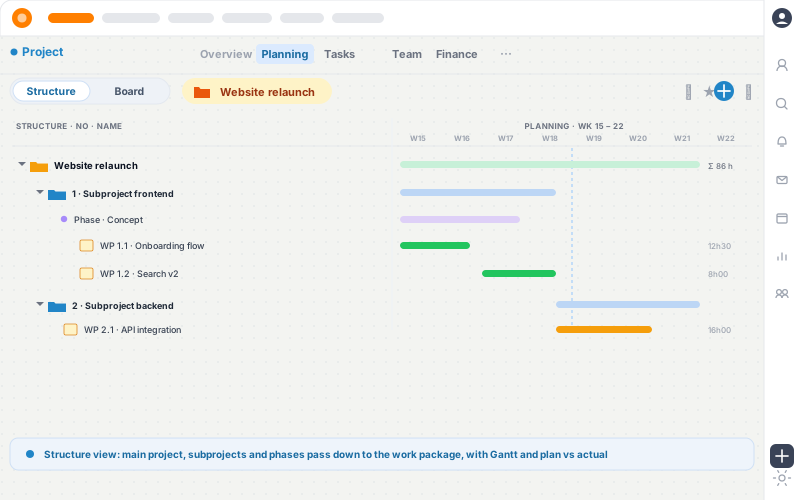
A sprint is about planned work that gets done and billed. That is why the card on the scrum board is usually the real work package: the project planned in the Gantt chart and the work on the board hang on the same item.
Anyone who keeps cards and hours in two worlds knows the collateral damage: cards without hours, hours without a card, corrections at month end. In a sprint it is one item.
In the flow
Where work keeps coming in, it is less about a single work package and more about the overview: what is open, what is running, what is stuck? For this a kanban board often carries its own cards, each pointing to what is actually being moved. The card then keeps its own status, independent of the linked item.
That keeps the flow manageable without every item having to be a work package. When it is about the status of the work itself and about logged hours, teamspace shows the list of work packages directly as a board, which is the typical case in a sprint.
Choosing a method
Kanban and Scrum are both agile methods; they differ in rhythm. Which one fits depends on the kind of work, and nobody has to commit for good.
Many teams use both in parallel: development in sprints, support in continuous flow. One thing you should know: reports such as a burndown chart or a velocity figure are not part of it. A board shows status in columns, not a sprint chart.
Scope
“We mostly work with the budget column.”

Method
Agile project management is a way of working that does not plan a project in full once, but delivers in short, visible steps and keeps adjusting the plan along the way. Instead of a rigid end plan there is a pool of tasks from which the team pulls the next one. The term goes back to the "Agile Manifesto" from software development in 2001, but has long since spread to project work of every kind.
Three ideas carry the method, whatever the tool:
In teamspace you map this idea onto real project work packages, with kanban for the flow and Scrum for the rhythm. What both boards deliberately leave out are sprint reports such as burndown or velocity; they carry freely configurable status columns, not measurement charts. The real lever lies elsewhere anyway: the card stays a real item and the hour goes straight into the project.
From plan to card
In five steps a planned work package becomes a card the team moves, and the hour lands back in the project.
Structure, phases and work packages are set up in the project, with budget and owners.
Kanban for continuous flow or Scrum for a sprint rhythm, both on the same work packages.
In a sprint, work packages move onto the board as cards; in the flow, often tickets, goals or whole projects. Automatically or manually.
Everyone moves their cards through the statuses and logs hours on the linked work package.
Logged hours feed plan vs actual and contribution margin, and completed work becomes billable.
More from project management
Agile working is one of several views of the same project. Here are the two boards and the areas that connect directly to them.
Continuous task flow without fixed sprint periods.
Learn moreSprint backlog and status columns for the sprint rhythm.
Learn moreWork packages that cards point to and hours are logged on.
Learn moreWho carries how much load, calculated across all projects.
Learn morePlan vs actual and margin from the logged hours.
Learn moreBillable work from the board into the invoice.
Learn moreYour questions
Which method suits your teams?
In 20 minutes we look at which of your work belongs in continuous flow and which in a sprint rhythm. You get clear first feedback on how agile working in teamspace fits your projects.
In overview
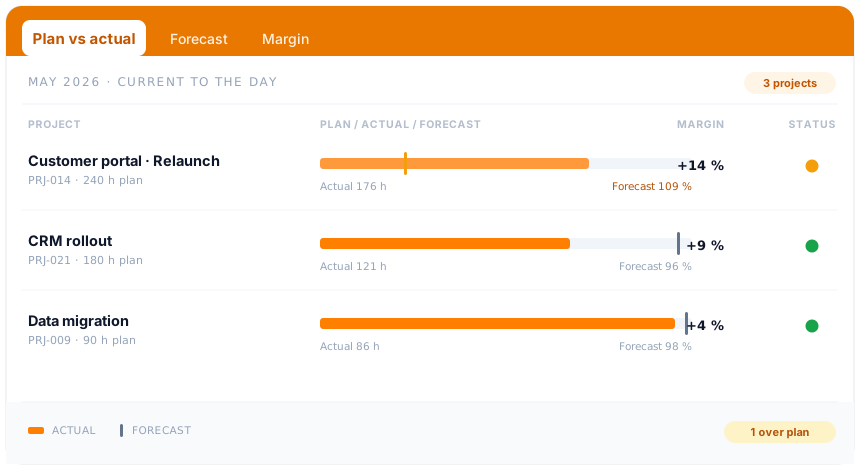
Boards move items in an agile way. How teamspace plans, steers and bills projects, from plan vs actual through earned value to the invoice from the project, is shown in the project management overview.
To project managementRelated modules
Whoever moves tasks in an agile way almost always deals with the hour, the invoice and the contact. Here are the shortest routes there.
Hours land on a card's work package and are the basis for plan vs actual and billing.
Completed work becomes the invoice, with hourly rates, flat fees and billing rules.
Contacts from a sales campaign sit as cards on the board and stay connected to the customer record.
First call
You show us your projects and your status workflow, and we set up kanban or Scrum around it. At the end you know whether agile working in teamspace suits your teams.